Table of Contents
Purpose
This document serves to provide our partners with a comprehensive understanding of AWS Partner Led Technical Support at Ingram Micro. It outlines who we are, our roles, and the scope of our services. The document aims to explain the nature of the technical assistance we provide, as well as the specific obligations and benefits associated with our support services. By clearly defining these aspects, we aim to ensure our partners are well-informed and can effectively leverage our support to maintain optimal product functionality and satisfaction.
Audience
This document applies to Partners and end users, providing them with essential information about AWS Partner Led Technical Support at Ingram Micro.
What is AWS Partner-Led Technical Support?
AWS Partner Led Technical Support is a purchased SKU for AWS services that is the first line of defense when an AWS service component malfunctions, i.e., Break-fix. We offer a tiered support structure with Agents capable of resolving increasingly complex technical issues.
Break-fix is an IT support model in which technical services are provided only when something breaks or malfunctions. The term is often used to describe reactive support, meaning actions are taken after a problem has occurred, rather than proactively preventing issues.
Our Break-fix services are provided to our partners and their customers to ensure that their products return to standard functionality as quickly as possible. In partnership with Amazon Web Services (AWS), we offer support for cloud-based products in specific scenarios.
How our Support Works
Engaging Support
Our AWS Partner Led Technical Support Team provides reactive (break/fix) support through our in-house Technical Support Team in collaboration with Amazon Web Services.
How to Contact Ingram Micro AWS PLS
Ticket Submission and Support Guidelines:
Partners can submit tickets via the Ingram Micro Xvantage for End Customers (follow the Marketplace URL setup by the Partner).
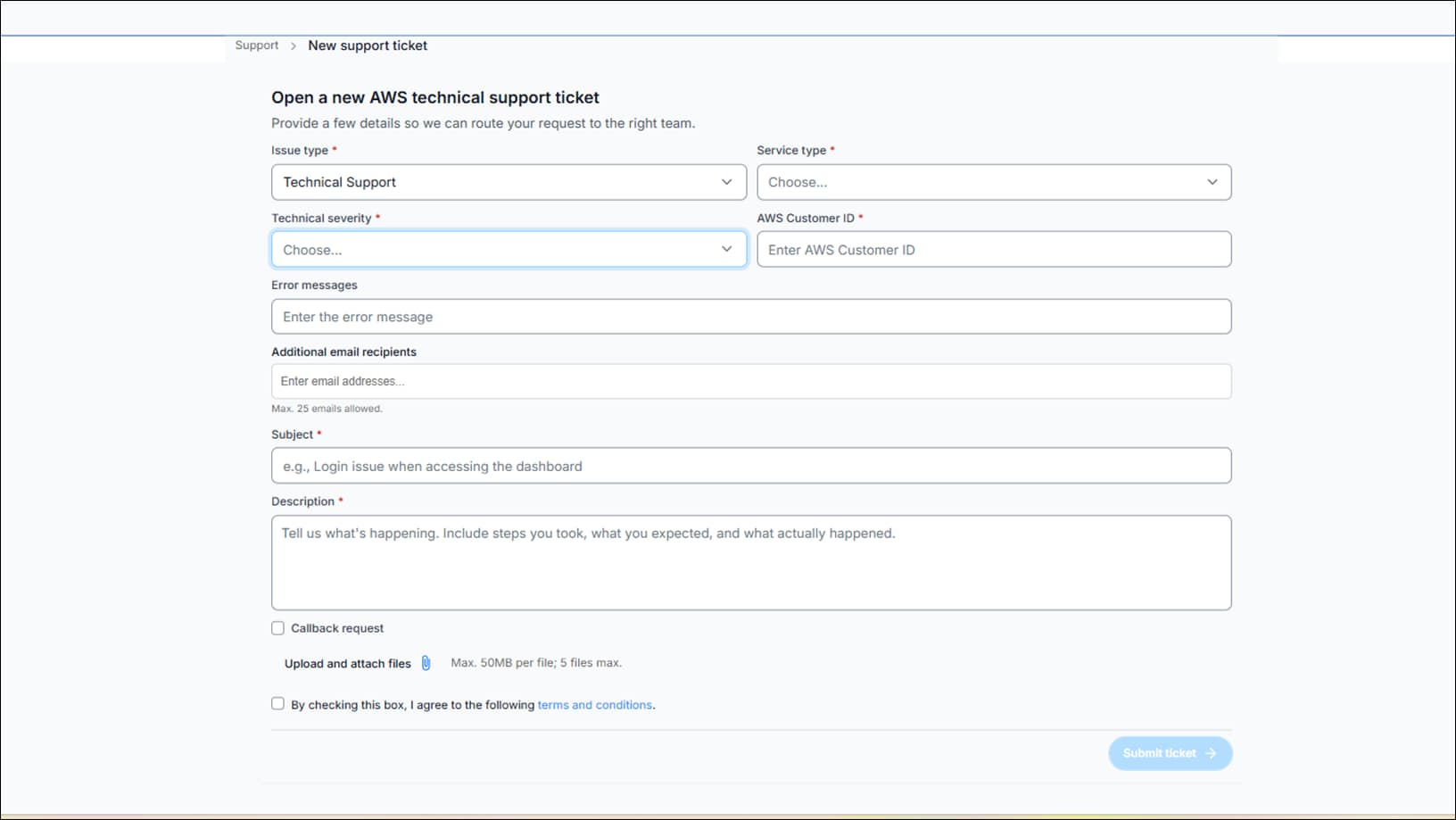
Once signed in to Ingram Micro Xvantage for End Customers (X4EC), select the Support icon located in the bottom left corner, and you will be presented with a form to submit your ticket.
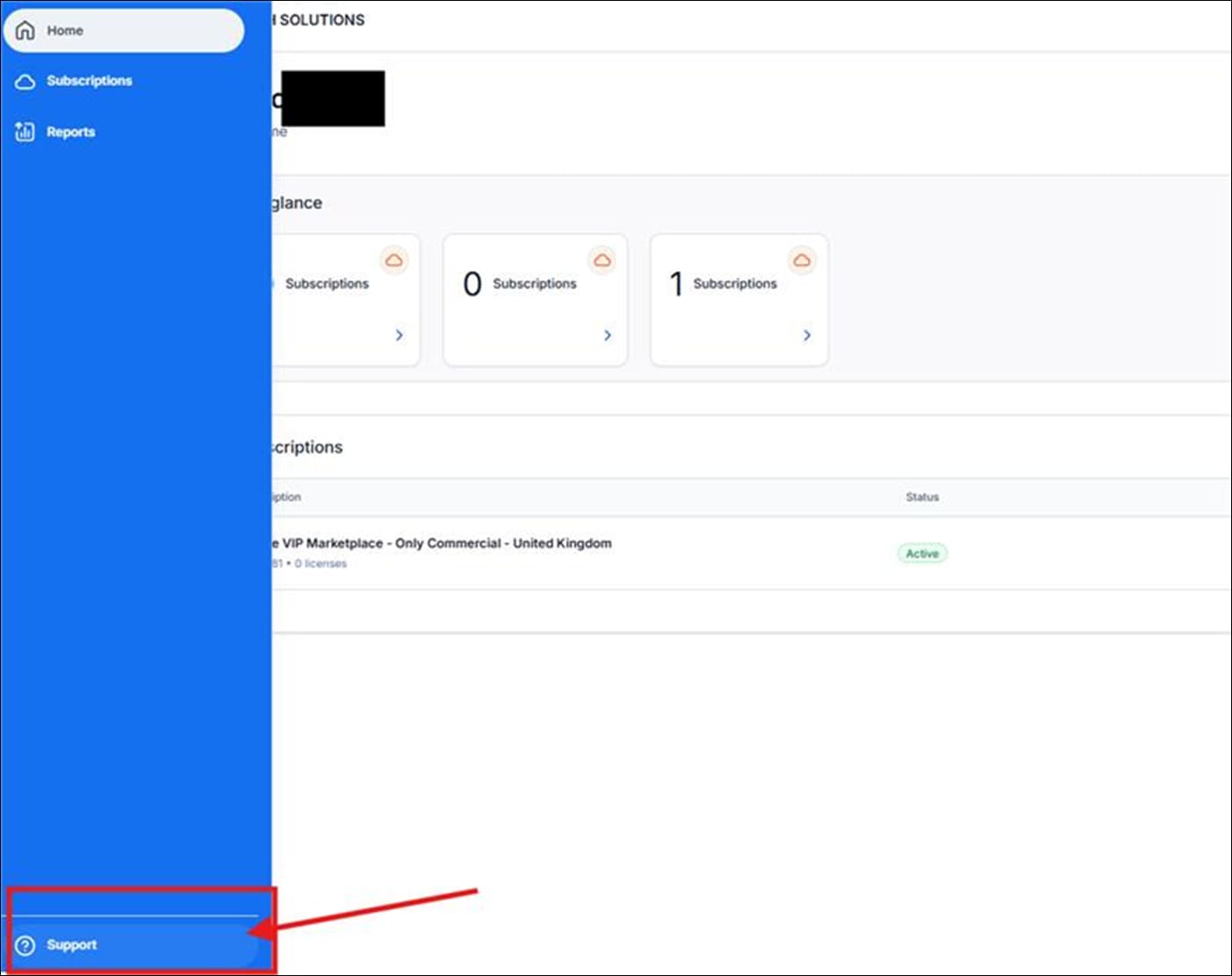
Note: For critical (Enterprise) issues, please ensure they are identified when you submit a case in the Portal. (Please see the screenshot of the Support form for reference.)
Support Form
Support Hours of Operation
Our Support operates 24*7
Support Escalation Management
Through our Support Escalation Management process, we ensure that Technical Support issues requiring escalation within Ingram Micro or AWS are effectively managed. We expedite and escalate business-critical tickets to ensure timely resolution. Additionally, we provide feedback to relevant groups and business owners within Ingram Micro, ensuring continuous improvement and optimal support experiences.
Escalation Resources
Step 1: AWS Partner-Led Support Team | |
|---|---|
Action: Request a callback via the AWS Support Portal. | |
Purpose: If you are not seeing a response or need to express the urgency of your issue, start here. This team provides initial troubleshooting and resolution. | |
Contact information | |
Name | AWS PLS Support Team |
Step 2: AWS Support Managers | |
|---|---|
Use this step only if Step 1 does not resolve your issue. | |
Action: Complete the online escalation form to reach AWS Support Managers. | |
Purpose: If your case is not being handled the way you would expect or requires managerial oversight, escalate here. | |
Contact information | |
Name | AWS Support Managers |
Request Form | |
Step 3: Executive Escalation | |
|---|---|
Use this step only if Steps 1 and 2 have not brought results. | |
Action: Email the senior escalation team directly. | |
Purpose: If previous steps have not resolved your issue, contact senior leadership. Please include your ticket ID and a brief description of the problem. | |
Contact information | |
Name | GBL – AWS Tech Support Escalation |
Scope of Support
The scope for AWS Partner-Led Technical Support is broadly outlined below. Ingram Micro AWS PLS team handles issues and escalates as required, related to AWS Services, including:
| Business | Enterprise |
|---|---|---|
Target Audience | Minimum recommended tier if you have production workloads in AWS | Recommended if you have business and/or mission-critical workloads in AWS |
Architectural Guidance | Contextual to your use cases | Consultative reviews and guidance based on your applications |
Technical Account Management |
| Designated Technical Account Manager (TAM) to provide consultative architectural and operational guidance delivered in the context of your applications and use-cases to help you achieve the greatest value from AWS |
Enhanced Tech Support | 24/7, AWS Support Case - Contact Method by Web Portal, access to Cloud Support Engineers. Unlimited cases and unlimited contacts (IAM supported) | 24/7, AWS Support Case - Contact Method by Web Portal, access to Cloud Support Engineers. Unlimited cases and unlimited contacts (IAM supported) |
Billing Assistance |
| Proactive support in managing billing, including proactive cost optimization, FinOps support, cost analysis, and prioritized answers to billing questions |
Proactive Programs and Self-Service | Access to Support Automation Workflows with prefixes AWSSupport and AWSPremiumSupport Annual proactive security review. Enterprise On-Ramp customers receive one AWS Countdown engagement each year at no cost. AWS Countdown Premium is available as a monthly subscription for an additional fee. | Access to proactive reviews, workshops, and deep dives. Access to Support Automation Workflows with prefixes AWSSupport and AWSPremiumSupport AWS Countdown is included with Enterprise Support. AWS Countdown Premium is available as a monthly subscription for an additional fee. |
For reference: https://docs.aws.amazon.com/whitepapers/latest/public-sector-cloud-transformation/core-services-and-additional-services.html
AWS Severity Overview and Response Objectives*
When a case is raised to AWS, you can expect the following response times* based on the criticality of the incident.
Business | Enterprise |
|---|---|
Urgent = 1 hour | Critical = 15 minutes |
High = 4 hours | Urgent = 1 hour |
Medium = 12 hours | High = 4 hours |
Low = 24 hours | Medium = 12 hours |
| Low = 24 hours |
*Ingram Micro or AWS may, at its discretion, change the severity level depending on the true urgency of the ticket so as not to over-utilize the escalation process.
Severity | Severity Level Code | First-Response Time | Description and Support Plan |
|---|---|---|---|
General guidance | Low | 24 hours | You have a general development question or would like to request a feature. (Developer, Business, Enterprise On-Ramp, or Enterprise Support plan) |
System impaired | Normal | 12 hours | Non-critical functions of your application are behaving abnormally, or you have a time-sensitive development question. (Developer, Business, Enterprise On-Ramp, or Enterprise Support plan) |
Production system impaired | High | 4 hours | Important functions of your application are impaired or degraded. (Business, Enterprise On-Ramp, or Enterprise Support plan) |
Production system down | Urgent | 1 hour | Your business is significantly impacted. Important functions of your application aren't available. (Business, Enterprise On-Ramp, or Enterprise Support plan) |
Business-critical system down | Critical | 15 minutes | Your business is at risk. Critical functions of your application aren't available (Enterprise Support plan). Please note that the Enterprise On-Ramp Support plan is a 30-minute time frame. |
Shared Responsibilities
Effective incident management relies on the coordinated efforts of all parties involved. Below are the shared responsibilities and expectations for Ingram Micro and Customers to ensure smooth and efficient handling of cases:
RACI - SHARED RESPONSIBILITIES | |||
SHARED RESPONSIBILITIES | INGRAM MICRO | CUSTOMER | VENDOR |
Each ticket will be placed in a queue and handled in order of priority | R/A | C/I | I |
Ingram Micro will manage each ticket from initiation to resolution | R/A | I |
|
Partners and end-customers will be included in AWS communications for complex tickets where all parties have action items and require broad communication. | R/A | R/A | R/A |
Ingram Micro will schedule Teams calls as necessary, based on the case requirements. | R/A | I | I |
If AWS experiences service delays, it could affect the SLOs from Ingram Micro Unified Support. | A/C | I | R/A/C |
A new ticket must be created for each separate issue | I | R/A |
|
Customers need to provide relevant screenshots of existing configurations and architecture designs as per AWS's best practices to help Ingram Micro frame the case as a break-fix | R/C/I | R/A | I |
The customer is required to remain actively involved in the ticket. Should there be no response after three consecutive business days of attempted contact, the case will be temporarily archived. | C/I | R/A | I |
If a ticket is archived for more than 10 days, please open a new ticket and reference the original ticket number. | C/I | R/A | I |
R - Responsible A - Accountable C- Consulted I – Informed | |||
Appendix AWS Break/Fix Support
AWS IAM Roles
The cloud formation script and instructions to follow: How to Create a Stack with AWS CloudFormation
Root Cause Analysis Requests
After a workaround has been provided and AWS has resolved an incident, a customer may want to know what caused the issue, also known as a Root Cause Analysis.
Official Word About RCA
The Root Cause Analysis (RCA) provided by AWS contains confidential information and is subject to the Non-Disclosure Agreement (NDA) between you and AWS. Neither the RCA nor its content may be shared with your end users or other third parties. If you would like to provide information about the event to your end users, you may do so, provided that the information you provide is based on your own knowledge and understanding of the event and is separate from the confidential information contained in the RCA. You may not copy, quote, or otherwise use confidential information from the RCA in your communications with your end users.
For more information about public messages during the event, please visit the AWS Health page.